Friday, September 20, 2024

No Rest for The RESTful: Chaining Together Calls To The Horizon Server API

My previous post focused on getting familiar with the Horizon Server API using Swagger and Postman.  This post will review how to chain together Horizon Server API calls to automate Horizon tasks.  Using Postman collections we can configure sequences of calls that build upon each other, passing variables from request to request.  More specifically, there's JavaScript wrapped around each request through pre-request and post-requests scripts that share variables across the collection.


Postman has a rich offering for testing out API responses including a Java Script API, code snippets, and custom AI generated code.  For the purposes of automating Horizon tasks we can get an awful lot done with very little JavaScript, in some instances just two lines of code.  So, while this post will get into some JavaScript weeds, it's more about understanding how to interface with the Horizon Server API, how to interpret it's JSON responses, and chaining multiple requests together to achieve a complex outcome.  These lessons will be applicable regardless of what programing language you go on to leverage for the Horizon Server API. 

Pulling Values From Horizon Server API Responses

Responses from the Horizon Server API will include a JSON object or array of JSON objects. JSON objects are collections of key\value pairs, separated by colons and  commas, wrapped in brackets.   The values of these key\value pairs can be strings, other objects, arrays or even arrays of other objects.  To access specific data in these responses you can leverage Postman's JavaScript API within the post-response script.  For example, pm.response.json() is used to parse the response body into a JavaScript object:

const jsonData = pm.response.json();

At this point, we can leverage the jsonData object to explore the values of the JSON object programmatically with JavaScript, pulling any data off of it we need.  The Login call included in the Horizon Server API Shenanigans collection does just that.  After a successful call to the login endpoint a JSON response is returned that includes an access_token key/value pair.  The post-response script then assigns this JSON response to jsonData, an object we can harvest the access_token value from by referencing jsonData.access_token.  


The access_token value is assigned to the global JWtoken variable using pm.globals.set("JWtoken", jsonData.access_token), another example of Postman's JavaScript API.  The rest of the calls throughout the collection are configured to insert the value of this JWtoken variable within the header of their requests.   If you navigate to the authorization tab of the root of this collection you can see how Postman is configured to automatically leverage this token for authentication.   


To illustrate further here's an example of the JSON object returned by the external/v1/ad-users-or-groups/{id}, a mechanism for retrieving a specific Active Directory user:    


Now, say we want to grab the id value from this JSON object.  Similar to the  post-resonse script for Login, we can add the following two lines of code: 

const jsonData = pm.response.json();
pm.collectionVariables.set("ad_user_id", jsonData.id);

Once again pm.response.json() converts the JSON response into a JavaScript object, jsonData, that we can use to extract our desired data from.   Then we access the id value using jsonData.id, assigning it to the collection variable ad_user_id.  We could just as easily grab other values from the object as needed.  Say we wanted to retrieve not only the id value, but also the login name and email.  No problem:  

pm.collectionVariables.set("ad_user_id", jsonData.id);
pm.collectionVariables.set("ad_login_name", jsonData.login_name);
pm.collectionVariables.set("ad_email", jsonData.email);

Now, we've yanked 3 values off the JSON object, assigning them to the collection variables ad_user_id, ad_login_name and ad_email.  


Pulling Values From JSON Objects With Objects For Values

Now, what about situations where you have a JSON object with other JSON objects as values?  For example, the output of the inventory/v2/sessions/{id} endpoint.  Note the assigned values for client_data and security_gateway_data are JSON objects. 


Say for instance you want to extract the IP address of the client.   Similar to the examples above, you use pm.response.json() to parse the JSON response into a JavaScript object, jsonData.  Then, to access the client ip address you go with jsonData.client_data.address.  You can easily confirm it's value using console.log(): 


If you look at the console after execution you'll see the value of the address yielded:


While this should all seem fairly straight forward so far, something to keep in mind is that often responses yield arrays of JSON objects to sort through, in some cases, very, very large numbers of them.  Fortunately, some of the Horizon Server API endpoints support filtering, a way to narrow down the JSON objects returned within a response.  


Filter Query Params - Using Objects To Filter Objects

A subset of Horizon Server API endpoint include support for filter parameters to narrow down results when multiple JSON objects are returned. Examples are inventory/v2/sessions or external/v1/ad-users-or-groups, endpoints that could easily return thousands of objects. In a nutshell, these endpoints accept filter query params, JSON objects that define how to filter and what value to filter by.   Here's an example: 

{
    "type": "Equals",
    “name": “login_name",
    "value": “cmoltisanti”
}


The, "name," value represents the name attribute we're we're focusing the filter on.   In the case above we're talking about the login_name.   The, "value," represents the value for the login name we're focusing on.  In the example above it's cmoltisanti.  Finally, the type represents the type of filter we're using.  In the object above it's, "equal."  (Possible values for filter types are Equals, NotEquals, Contains, StartsWith, Between, And, Not and Or.)  So the filter object example above is targeting objects with a login_name that is equal to cmoltisanti.  

In order to pass a filter query object to an endpoint we have to do two things to it.  We have minify it and then encode it.  Minifying amounts to removing all the unnecessary white space.  You could do it manually or use a utility online.  After using the first utility I found outline, I ended up with this: 

{"type":"Equals","name":"login_name","value":"cmoltisanti"}

Then, to encode it I went to https://www.urlencoder.org/.   I ended up with this: 

%7B%22type%22%3A%22Equals%22%2C%22name%22%3A%22login_name%22%2C%22value%22%3A%22cmoltisanti%22%7D

Going back to the ad-user-or-groups call in Postman, you add a new query param called, "filter," with the encoded query object as a value.   


Now, instead of getting every single user and group from my AD environment, I get the specific record for the login_name cmoltisanti. 


It's an absolutely ugly URL, but the results are gorgeous.  Instead of having possibly thousands of objects to sort through, I've got the single AD account I'm looking for.  Also, I can easily reuse this ugly filter string to target any other user by simply replacing cmoltisanti with another valid login name.  


For more guidance on filtering, check out the Horizon Server REST, Pagination and Sorting Guide. 


Nailing Down The Filter Syntax With Swagger

To illustrate how handy this process can get, I'm going to review a challenge I had developing a call to inventory/v5/machines.  I needed to leverage advanced filters and for one reason or another I just couldn't get the syntax right within Postman.  So I headed over to the Swagger interface and navigated to inventory/v5/machines, then clicked the option, "Try it out." The interface already had a template in place for a filtering option.  


This preconfigured suggestion for filtering looks like this: 

{ "type": "And", "filters": [ { "type": "Equals", "name": "", "value": "<>" } ]}

To get it configured I populated it with the name of the value I wanted to match against and the actual value. So the object's value I wanted to match against was, "name" and the value was Win10-22H2-Manual-Pool. So, I edited the filter accordingly.

{ "type": "And", "filters": [ { "type": "Equals", "name": "name", "value": "Win10-22H2-Manual-Pool" } ]}

After making the edits, not only did I get successful execution against the local Horizon Connection server, but I was provided with syntax for making the call with the proper filter.   Note the long nasty request URL: 


When copying this request URL directly into Postman it automatically recognized the filter parameter and organized it in the interface as such.  


How was I messing up originally?  I don't care anymore. I used Swagger to get the answer I needed and was able to move on to life's other mysteries. 


Pulling Values From Filtered JSON Object Arrays

Earlier in this article we reviewed parsing a json response with pm.response.json(), creating a JavaScript object called jsonData that we could use to access different values of the parsed object.   Specifically, we used jsonData.access_token to harvest the access token from a successful response from the login endpoint.  We performed a similar process to pull data from a successful response from inventory/v2/sessions/{id}, using jsonData.client_data.address to retrieve the ip address of a client connection.   There's a similar but significantly different process for yanking info off our object retrieved from the filtered query above.  Take a second look at the output of that filter against the cmontisanti login name.  While there's a single JSON object displayed, it's actually an array with a single JSON object in it.  Make a note of brackets:  


To more clearly illustrate this nuance lets leverage console.log() again, taking jsonData from our filtered query and printing it to the console.  Using console.log() in this manner provides a way to explore the structure of our JSON response.  


After executing our call we can see the results in the console.   Here we can clearly see that jsonData is actually an array with a single element in it, the JSON object representing cmoltisanti.


Fortunately, because this filter does it's search based on a unique attribute, the AD login_name, we're only getting a single object array.  Getting access to it's data is simply a matter of calling out the index of this array object, 0 because there's only a single object to choose from.  So we specify jsonData[0].what_json_object_name_we_want_the_value_of.  In this example, we're looking for the user id, so it's jsonData[0].id.  


Pulling Requests Together For Desktop Pool Entitlement And Session Management

Using the lessons we've reviewed about parsing and filtering JSON responses we can chain four separate calls together to entitle a user to a desktop pool.   After importing the Horizon Server API Shenanigans collection, navigate to the Assign User To Desktop Pool folder within the Horizon Automation folder: 


The Login request uses the login endpoint to authenticate and then retrieve an access token.  Then a filtered call to external/v1/ad-users-or-groups is used to obtain the ID of the target user.  In a similar fashion, a filtered call to inventory/v4/desktop-pools obtains the ID of the target desktop pool.  Finally, both IDs are passed as variables into the body request of a call to entitlements/v1/desktop-pools, where the final magic happens.  

To get started using this sequence, along with the variables for login credentials, you need to set two collection scoped variables, target_user and target_pool.


Populate these variables and then begin sending these calls in sequence one a time.  You'll end up with a new entitlement.  


Or, you can run the entire folder at once by right clicking on it and selecting, "Run Folder."  Postman's Collection Runner will spring into action, executing the sequence in order, then provide a summary of the execution. 


Whether you run the sequence through Collection Runner or manually execute the preconfigured calls one at a time the general process is the same.  We start with some preconfigured collection scope variables, then each call retrieves additional required variables, building upon each other till we achieve the final outcome of entitling the user to the target pool. The Message User And Disconnect task sequence within the Horizon Automation folder works very similarly, except you need only set the login credentials and target_user collection variable before kicking it off.  


Looping Through Arrays Of JSON Objects

When dealing with responses that are arrays of JSON objects there's times where it's necessary to iterate over every object of the array. For that we can turn to JavaScripts forEach() method. An example of this is the Get target_app_id for target_app call within the Kill Specific App In Session automation.


In this example I use the forEach() method to iterate over every object within the jsonData object returned by pm.response.json() after a call to helpdesk/v1/performance/remote-application.  In this scenario jsonData is an array of JSON objects that represent different applications running within an active session.  The forEach() method allows me to walk through each one of these objects, comparing the apps name to the target app I'm looking for. 
 
    jsonData.forEach(function(da_apps){
        if (da_apps.name.toLowerCase()  == targetApp.toLowerCase() ) {
        pm.collectionVariables.set("target_app_id", da_apps.remote_application_id);
        }
    })

If there's a match the collection variable target_app_id is assigned the remote_application_id associated with the matching JSON object.  This variable is consumed by the next call, Kill target_app, to terminate the application within the session.  

In this example it was necessary to iterate through every JSON object partially because their was no filter supported by the helpdesk/v1/performance/remote-application endpoint.   So I had to roll up my sleeves and walk through the entire array of returned objects to find what I'm looking for.  I dealt with a similar challenge in my Add VMs To Manual Pool automation.  In that scenario I had to locate a target VM from an array of JSON objects returned from a call to external/v1/virtual-machines. Again, there was no filter option supported by the API to narrow my search down to a single JSON object response.  So I used the forEach() method to iterate over each object till I found a matching VM name, then harvested it's vCenter VM id.  


This is probably as technical as I've had to get in terms of my understanding of JavaScript coding. When working with Postman the forEach() method is something you can fall back to pin point a single object or harvest information from multiple objects in an array of JSON objects.   It's a strategy I'll explore in different languages in future posts. 


Now Doowutchalike

While Postman is an excellent way to explore the Horizon Server API and share requests with other admins, you're free to choose pretty much any programing language, OS, or endpoint your wish to develop your solution on.  That's a major benefit of the modernization of Horizon's API to a REST based architecture.  Though Postman can make for a very compelling option in some use cases, it's been used in these last two posts mainly for teaching and illustration purposes.  You should have an easy time adapting these lessons to any language of your choice with a few adjustments.  


No Rest For The RESTful: Omnissa's Horizon Server API

The Horizon Server API is a RESTful API that supersedes the legacy View API for Horizon.  It's the outcome of a modernization effort years in the making, a REST based API at full parity with it's predecessor as of the Horizon 2312 release. While Horizon currently supports both the newer and legacy API, the writing is on the wall.  Going forward new Horizon automations should be created using the Horizon Server API and any previous automations based on the View API should be considered for migration. 

https://developer.omnissa.com/horizon-apis/horizon-server/


Customers have the flexibility to access the RESTful Horizon Server API from pretty much any programing language, OS or endpoint imaginable, a major advantage over the PowerShell constricted View API.   However, many Horizon admins are unfamiliar with RESTful APIs and the principals that guide their use, so I've put together this primer.  After a brief review of RESTful concepts I'll focus on Swagger and Postman as tools to get familiar with the Horizon Server API.  


RESTful APIs 

When making calls to the Horizon Server API and it's various endpoints, the base url will be https://<fqdn_of_connection_server>/rest/.  For example, my Horizon Connection Server is horizon.evengooder.com, so the base URL is https://horizon.evengooder.com/rest/.  Then there's the various endpoints offering different functionality, such as monitor/v3/connection-servers, inventory/v2/sessions, or external/v1/ad-users-or-groups.


Leveraging various endpoints is all about sending HTTP requests to these URLs and in turn receiving HTTP responses.  The exact requirements for the requests vary from endpoint to endpoint.  Some require special parameters to the URL or path variables, while others require specific JSON attributes within the body of the request.  The responses vary as well, though they all involve returning data in the JSON format within the body of the responses. 

Intro To APIs Part 3: HTTP Protocol Explained - https://www.youtube.com/watch?v=FAnuh0_BU4c&list=PLM-7VG-sgbtBBnWb2Jc5kufgtWYEmiMAw&index=3


The JSON objects returned are collections of key\value pairs, separated by colons and commas, wrapped in brackets.   The values of these key\value pairs can be strings, other objects, arrays or even arrays of other objects.   


This standardized format makes the Horizon Server API output easy to work with across languages.  As json.org puts it, "JSON (JavaScript Object Notation) is a lightweight data-interchange format. It is easy for humans to read and write. It is easy for machines to parse and generate."  

An ideal way to begin exploring the various Horizon Server API endpoints is through the Swagger implementation available by default on your Horizon Connection Servers.  Along with providing documentation, this Swagger implementation is essentially an HTTP client with training wheels, guiding admins in the execution of calls against the local instance of the Horizon Server API. 


Swagger Like Us

While there's on-line documentation available for the Horizon Server API, the Connection Server's built-in Swagger implementation provides a readily accessible and more useful alternative.  It's accessed by pointing your browser to https://<fqdn-of-connectionserver>/rest/swagger-ui/index.html.  


As you explore the various endpoints you'll see there's an option to execute against them directly from within the documentation using a built-in client.  The client prompts for any required parameters, path variables or body responses needed for successful execution of a specific endpoint, helping nudge customers towards proper syntax.  For example, there's a call you can make to inventory/v8/desktop-pools to get information regarding a specific desktop pool.  Since it requires a desktop pool's ID as a path variable the Swagger interface prompts for the ID, indicating it as required. 


When you provide the necessary ID and execute you'll see the client automatically appends the ID to your call for you. 


Along with required parameters or path variables Swagger also provides guidance on any attributes required in the request body.  Take for example the entitlements/v1/desktop-pools endpoint.  Swagger provides a sample of the name/value attributes required to execute this call successfully.  Replace them with valid ad_user_or_group_ids and a proper desktop pool ID and you'll get your entitlement created. 


Before executing calls through Swagger it's necessary to obtain a valid bearer token for authentication.  The most common way to do this is through the login endpoint under Auth.


After clicking on the option to, "Try it out,"  you'll see a preconfigured response body with variables to fill out.   Enter in the domain name, short AD username, and password for an account with admin privileges. 


Hit the execute button and if things go well you should see a body response that includes an access_token name and value.  


Copy the access_token value, navigate back up to the top of the Swagger interface and click the authorize button.   Paste the access token in as your Bearer value.  


At this point you can fire at will, leveraging all the different endpoints available from the Swagger interface for the default 30 minutes the access_token takes to expire. 

Overall, Swagger offers a solid process for nailing down your syntax and getting your hands dirty quick with the JSON output.  As far as I'm concerned Swagger on the local Connection Server should be the first stop for anyone looking to explore a specific endpoint.   However, if you're looking to explore more complex tasks that involve multiple calls working together Postman is definitely worth checking out. 


Getting Further Acquainted With The Horizon Server API Through Postman

Postman is an HTTP client designed to assist with the development and testing of APIs.  As such, it's an ideal vehicle for getting familiar with the Horizon Server API and it's REST architecture.   A free version of Postman is available after registering at Postman.com.   Once registered you can log into Postman and easily import my own Postman collection, Horizon Server API Shenanigans, by clicking on this button:


After importing the collection you'll have access to handful of requests, including some advanced sequences within the Horizon Automation folder. 


This collection is an adaptation of a collection originally shared by Chris Halstead in 2019.  While his shared collections attempted to provide preconfigured calls for every supported endpoint, Horizon Server API Shenanigans is a more stripped down collection of calls for the purpose of demonstrating how to chain Horizon REST API calls together.  It shamelessly borrows the authentication scheme introduced in Chris's original work.  The process starts by entering in your admin AD credentials in the collection's Variables tab.


After setting those variables navigate to the Login call within the root folder and execute it.   If the call is successful a JWtoken global variable is assigned a fresh access_token.   The collection is configured so that this access token is automatically inserted in the header of other calls executed by the collection.  If you look at the authorization tab at the root of the Postman collection you can see how this is configured:


All the other calls are configured to emulate this authentication scheme by leveraging the option, "Inherit auth of parent."  So, once you've successfully executed this first call you can fire at will with all the other ones, at least until your access token expires in 30 minutes.  An easy way to take things for an initial test spin is to poke around the Horizon Monitoring folder.  For example, here's the status for the Horizon Connection Server:


All these Infrastructure monitoring calls can be executed once the Login call has been run.   Other sequences, such as Message User And Disconnect, rely on additional variables getting set ahead of time.  I'll address this sequence in more detail next.  


Chaining Multiple Calls For More Advanced Procedures 

The main objective of Horizon Server API Shenanigans is to demonstrate how multiple calls to the Horizon Server API are chained together to perform complex automations.  For example, the Message User And Disconnect folder includes 5 different calls that build upon each other.  The first 3 calls have a post-response script configured to parse responses and retrieve variables that our leveraged for future requests.  For example, the call to the login endpoint is used to retrieve an access token that's used for the next 4 calls.  The external/v1/ad-users-and-groups endpoint is used to locate the unique ID associated with a specific user's login account.  The inventory/v1/sessions endpoint is used to locate a session ID associated with this AD account.  Finally. the send message and disconnect endpoints are used to send a message and disconnect a session.


You can see all this in action by first setting the target_user variable, under the collection's Variables tab, to the short AD login name for the user you wish to target.  Then navigate to the Message User And Disconnect folder and begin executing the calls one by one.   With the first call to the login endpoint the global JWtoken variable gets set.  After running Fetch target_user ID successfully the collection variable ad_user_id is set to the target user's ID.  After running Fetch target_user Session ID the collection variable SessionHunt gets set to the target user's session ID.  You can confirm how these collection variables have been set by navigating to the Variables tab of the collection.


Finally, the Send Message To User and Disconnect session calls will leverage the SessionHunt variable to send the target_user a message and disconnect them.


Within the Horizon Automation folder of Horizon Server API Shenanigans, similar flows are available for adding user entitlements to desktop pools, adding desktops to manual pools or killing specific applications within VDI sessions.   Each of these flows requires the setting of specific collection variables, like target_pool or machine_name.   


To get deeper on this topic of chaining calls together through variables and post-request scripts, check up my follow up article, No REST For The RESTful: Chaining Together Calls To The Horizon Server API.


Adding Additional Calls To Postman Via Swagger Exploration

You can add additional calls to your Postman collection by right clicking and selecting Add Request.


Rather than stressing about getting proper syntax and URLs lined up, you can get everything sorted out ahead of time through the Swagger interface.  For example, to add a new request to a monitoring API, navigate to saml-autheneticators under monitor within Swagger.  Hit the Try it out button and click execute.  You'll get a response like this: 


Note, not only have you successfully executed a call against the local Connection Server, but you have the request URL clearly spelled out for you.  You can copy and then paste this request URL directly into Postman and your off to the races:


That is a very simple example of how we can pull a query from Swagger into the Postman interface.  There are definitely more complex calls to adopt with this strategy.  These will be demonstrated in the follow up No REST For The RESTful: Chaining Together Calls To The Horizon Server API. 


Original Collection Put Out By Chris Halstead

Still available at GitHub today is a preconfigured Postman Collection for VMware Horizon REST API put out by Chris Halstead.  While this collection is a bit dated, last updated for Horizon 2111, I think it's still highly relevant and worthwhile for anyone getting started with the Horizon Server API today.   It includes 100's of preconfigured calls for folks to explore and tinker with, all organized according to endpoint type and versioning.  

While I'm a big fan of this collection, and Chris Halstead in general, it is slightly dated and starting to show it's age.  For one thing, I had challenges leveraging the collection variables for authentication purposes.  To get it working properly I had to change Username, Password and Domain to lowercase.  


Another challenge I ran into was that the authentication method for all the individual calls were defaulting to bearer token, rather than, "Inherit auth from parent."  So for each call I was interested in running I had to make this adjustment.   It's not rocket science once you know to do it, but it can lead to confusion.  


Finally, some of the logic includes deprecated code.  It still works, but can be a bit confusing for the uninformed as you see lines cutting across the screen.  


All that said, if you're looking to explore the Horizon Sever API it's silly not to take advantage of all these preconfigured and organized calls.   You can go ahead and create your own collection, but also import this collection and start copying it's most relevant calls into your own.  That's certainly what I did.  Stand on the shoulders of giants baby!  

Speaking of giants, along with these Postman Collections, Chris also once authored an article in TechZone called, "Using The VMware Horizon Server REST API." Like his collections, it was getting a little long in the tooth which is why I imagine it was removed from TechZone November of last year.  However, it was a beautiful piece of documentation, providing many a Horizon admin their first introduction to REST architecture and the JSON standard.  So I'd highly recommend taking a look at the original article using the internet archive.  Here's a link to a version of the document that was published as of November of 2023.  


"I got bills to pay 
 I got mouths to feed
 There ain't nothing in this world for free" - Cage The Elephant

For a lot of grizzled Horizon admin the trickiest thing about Horizon Server API adoption is it's REST architecture.  Sure, as windows admins they've had all the motivation in the world to learn PowerShell, but up till now they may never have had  reason to access a REST based API.  So for some folks there's a bit of a learning curve as they get up to speed with REST architecture and JSON format.  But once the Horizon admin is THERE, they're THERE and they can certainly do anything they've been doing with PowerCLI using the more modern Horizon Server API.  As an added bonus, getting up to speed on REST architecture leads to deeper understanding of how much of the internet runs today, and sets a foundation for automating against SaaS solutions that enterprises have been fully embracing.   

To get deeper into the Horizon Server API and REST principles in general, check out my follow up article, No REST For The RESTful: Chaining Together Calls To The Horizon Server API.  

Wednesday, July 5, 2023

A Primer On Unified Access Gateway For Citrix Admins Migrating To VMware Horizon

Folks considering a migration from Citrix to Horizon naturally ask, "what's the Horizon equivalent of NetScaler?"  Though Unified Access Gateway (UAG) is the closest comparison, it's not a like-for-like equivalent to NetScaler.  NetScaler is a multi-purpose application delivery controller, traditionally sold in pairs of physical appliances, with a history of solving complex problems far beyond the scope of Citrix remoting.  In contrast, Horizon's UAG is a purpose built, exclusively software based technology dedicated to VMware EUC workloads and little else.  So, while both solutions are used to proxy display protocol traffic for their respective suites, they're very different in scope and approach.  That said, to compete with the broader set of NetScaler capabilities UAG combines with components across the entire VMware portfolio to provide a modular, elastic, and cost effective alternative.

To be clear, NetScaler is very impressive tech with a broad set of capabilities extending far beyond app and windows remoting.  Load balancing, GSLB, web security, TCP offloading, etc... The common refrain is, "NetScaler does everything." The problem is NetScaler does everything and is priced accordingly, despite the fact most Citrix customers need it simply to proxy ICA sessions.  Usually these organizations have some other load balancing or ADC solution in place and quite often you hear of NetScalers sitting in the same racks as F5 appliances.  Unfortunately, NetScalers dedicated exclusively to the proxying of ICA sessions is an extremely common scenario, overkill most Citrix customers find themselves forced into as soon as remote access is required.  A colleague of mine jokes it's like having a Ferrari to drive 35mph for three blocks to a local market once a week.  In stark contrast stands Unified Access Gateway, a standard component of all VMware EUC suites, deployed at no additional cost, save the modest vSphere capacity used to run it.  While it already had proven itself by 2019, it's stellar performance during the pandemic cemented it's status as a hardened and mature solution.

Most Horizon customers have met their remote access requirements using UAG alone or UAG coupled with Workspace ONE Access, VMware's identity-as-a-service offering.  However, some organizations looking to sever ties with Citrix entirely may have a broader set of NetScaler capabilities to consider, beyond windows/app remoting or the EUC space entirely. To reiterate, the Horizon suite doesn't include a single product that competes directly with NetScaler.  However, the foundational functionality of UAG combined with the rest of the VMware portfolio overlaps a great deal with what most Citrix customers are doing with NetScaler today.  Though this combined offering doesn't cover absolutely everything NetScaler does, it certainly covers what's most common and germane, while introducing modern software and SaaS based alternatives.  Moreover, for a refreshing change, Citrix customers migrating to Horizon can freely and without coercion pick and choose amongst an al a carte alternative according to their specific needs. 


Customers using NetScaler to simply proxy published applications and VDI can likely meet their Horizon remote access requirements using UAG and whatever load balancing solutions they already have deployed.  If they're leveraging advanced authentication capabilities of NetScaler for Citrix sessions, for Horizon they can leverage UAG's built-in support for stronger forms of auth or tap into the capabilities of Workspace ONE Access.  In the case of Citrix customers using NetScaler for load balancing enterprise wide, VMware's Advanced Network Load Balancer (Avi) is a compelling software based alternative to consider.   For those leveraging the VPN capabilities of NetScaler, UAG and Workspace ONE UEM combine to deliver a Per-App VPN alternative.   Heck, for certain NetScaler use cases some customers might find VMware's SD-WAN offering, based on VeloCloud, a better fit.  The bottom line is that money spent on NetScaler could purchase an awful lot of different VMware products al a carte.  Further, if there isn't commitment to a one throat to choke model, shoot, VMware has plenty of partners to choose from.  Big picture, it's a question of what you can get done with the included capabilities of the Horizon suite + whatever solutions you could procure with resources previously dedicated to NetScalers.  That's a lot to think about.

Regardless of what NetScaler functionality might need replacing, UAG is definitely in the future of any Citrix admin migrating to Horizon, so this post begins with a concise primer on UAG that calls out key differences between UAG and NetScaler.  It then details load balancing requirements for UAG.   From there, stronger forms of authentication will be reviewed, both UAG's built-in capabilities and those gained from Workspace ONE Access, a SaaS solution included with Horizon Universal licensing.  Both NSX Advanced Load Balancer and WS1 Access are excellent examples of VMware's ability to replace NetScaler functionality with modular and elastics solutions.  Reviewing their potential adoption will shore up the readers understanding of UAG while providing context for other migration options from NetScaler to VMware solutions and services.  In a final twist, I'll call out a very reasonable path forward, using NetScaler and UAG together.  If not a permanent architecture, leveraging NetScaler + UAG is a very viable and in some cases, ideal solution, allowing folks to realize value in their NetScaler investments while they focus on the migration of app publishing and VDI to Horizon. 


Infrastructure As Code 

UAG was first released 8 years ago as an alternative to the Windows based Horizon proxy solution called Horizon Security Server.  As opposed to it predecessor, UAG is a hardened linux virtual appliance currently based on photon OS 3.0.  It's typically deployed on top of vSphere, though it's also deployed natively to clouds like AWS, Azure and GCP.   Over the years it's role has expanded to accommodate Workspace ONE UEM solutions like Per-App VPN and SEG.  Throughout the course of it's development security and stability have been a top priority, a fact quickly evident to anyone who's worked with the product.   Quite frankly, these things don't really break.  Most of the troubleshooting happens during initial setup and easily 95% of the time problems are with external environmental factors like misconfigured firewalls or general networking challenges.   Once UAGs are setup properly they just work and don't require much in the way of care, feeding, or maintenance.  With the release of Horizon 8 in 2020 UAG became the primary mechanism for supporting remote Horizon access as Security Server was deprecated.  By then, there was already tens of thousands of successfully deployed UAG instances, along with a rich set of documentation and codified best practices.  In short, UAG is boring, reliable, proven and predictable plumbing used by VMware's EUC solutions to provide secure access to on-premises resources.   

While security and reliability were top developmental objectives for UAG, ease of deployment was certainly lower down on the list of priorities.  Typically, mature environments entail the deployment of UAGs through PoweShell scripts run against vSphere.   This can be initially off-putting for folks, given network infrastructure specialist normally don't get their hands dirty with scripting.  However, while you're running a pre-canned PowerShell script provided by VMware, you're not actually writing or tweaking out PowerShell.  You're focus is on tweaking out an ini config file that the PowerShell script is run against, populating the ini file with info about your UAG instance like ip addresses, gateway and Horizon configurations.   Once you get a working config you end up with an easily repeatable and tweakable deployment process that typically takes about 3 minutes to stand up a new a completely functional UAG instance.  It's very much in the spirt of infrastructure as code, providing complete transparency.  We're not talking about standing up a physical device, giving it an adorable name, and marveling at it's mysterious and obscure workings.   We know how these UAG instances work.  It's spelled out clearly in an ini file that's reliably leveraged throughout various instantiations and upgrades.  


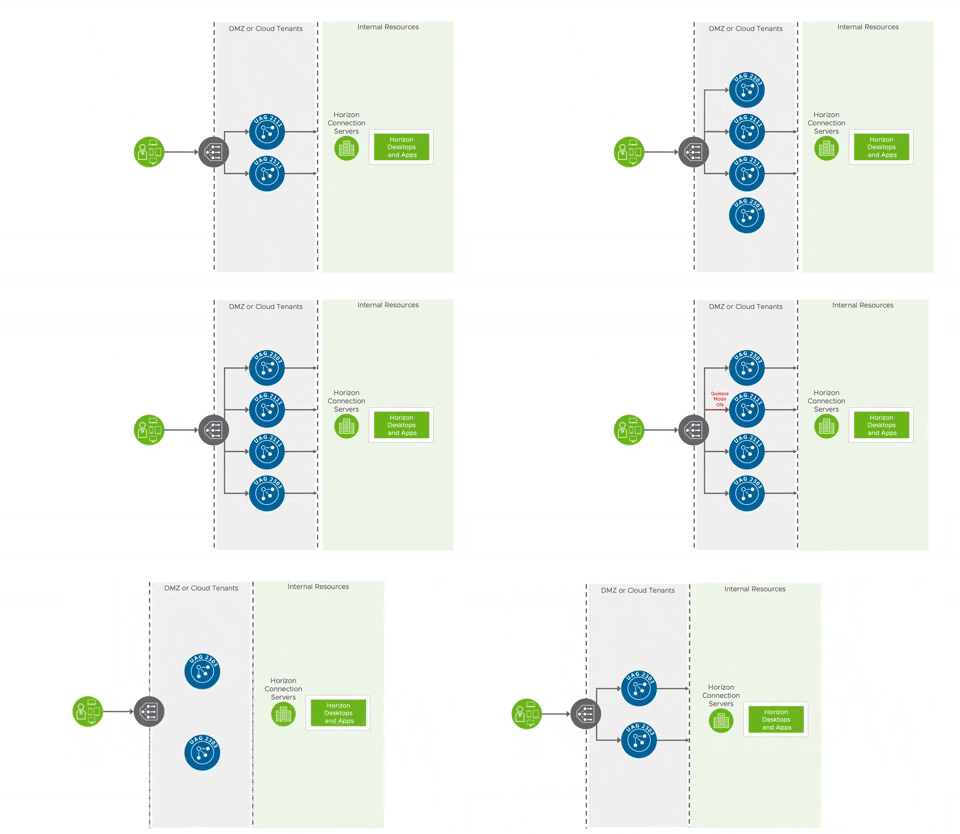
The first steps for most customers is to initially deploy a UAG appliance using an OVF wizard through vSphere, then fine tune the appliance configuration through it's web interface.  Once they have a working instance setup, they export the configuration settings from the web interface, and voila,  a working, reusable ini based config is available for redeployments, updates and scaling.  Backups of a specific UAG instance amounts to one of these ini files, certificates, and standard downloaded .ova for the specific appliance version.  Line these three resources up on a command line, and you're good to go with a redeploy in 3 minutes.  Tweak out names of the appliance and ip address, and you've got your 2nd, 3rd, 4th, or 5th UAG in the works.   With each UAG handling up to 2K sessions, logically you're entire UAG deployment adds up to a handful of ini's, certificates and downloaded .ova files.   Upgrades amount to downloading a new .ova, tweaking out the the .ova path of your ini's and redeploying through PowerShell.   New UAG instances are spun up behind the load balancer, while older versions are placed in a special Quiesce Mode as they're slowly drained of sessions and eventually decommissioned.  All of this can occur with zero downtime.   

When you get a process like this in place you get machine like reliability that rarely falters outside of environmental disruptions from dependencies like load balancers, ssl certs or the network.   In a nutshell, supporting infrastructures typically wears out before the UAG's do. If there is a challenge suspected with the UAG instance itself, one of the first troubleshooting steps is to redeploy. With UAG deployments being repeatable and largely uneventful affairs, redeploys are commonly leveraged both for migrations to newer versions and troubleshooting purposes.  This shift to a fluid, infrastructure as code, model is daunting at first, but with some planning and elbow grease, yields a reliable and transparent remote access solution that leverages and benefits from vSphere infrastructure.  Backups are a piece of cake, upgrades are non events and replicating deployments for new environments is straight forward.  Generally speaking, if something breaks, it's usually cause someone has done something stupid with a dependency.  (Can you tell I love this solution? I do. Don't even get me talking about it when I'm drunk. I'll call it folksy and blue collar, sexy and a little bit edgy.) 


Meeting Load Balancing Requirements For UAG 

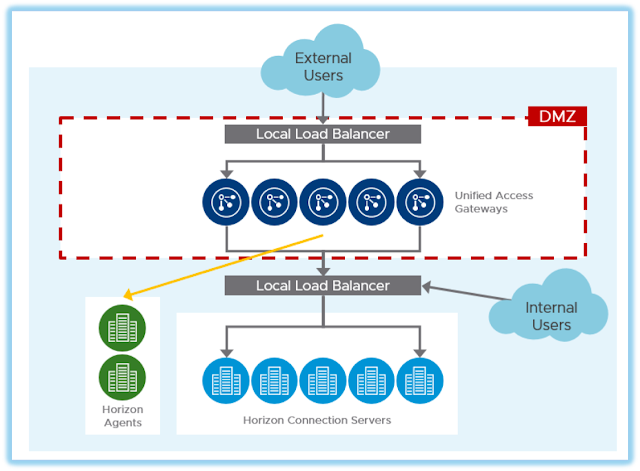
In typical deployments UAGs are placed within a DMZ between firewalls and 3rd party load balancers.  Along with enabling redundancy load balancers are key to the zero down time upgrades described in the previous section.  When comparing UAGs to NetScaler this requirement for external load balancing is one of the most common features gaps called out.  Fortunately, you can use one of the gazillion load balancers in existence to address this challenge.  Most customers I've interacted with have enterprise grade load balancers in place long before Horizon enters the picture.  Fortunately, load balancing requirements for UAG are straight forward and, to date, I've never come across a situation where an enterprises grade solution wasn't able to accommodate UAG.   The requirements are clearly spelled out in the article, Load Balancing Unified Access Gateway For Horizon.   Further, many vendors have their own processes specifically documented, such as this article from F5.   There's even solid guidance on leveraging NetScaler's load balancing capabilities for UAG, such as this article from the venerable Carl Stalhood.     


All that said,  if you're looking for a new load balancing solution VMware's is more than happy to sell you a software defined load balancing solution called NSX Advanced Load Balancer, what used to be called Avi Vantage.   It enables elastic scaling and provisioning of load balancing functionality through service engines that are spun up and down across vSphere and native hyperscaler environments, with a software based Avi Controller centralizing control and management.  When it comes to standard load balancing or global load balancing, it's competitive with any other load balancing solution you might run across, including NetScaler.   Most notably, it's incredibly cost effective, enabling agile right sizing of load balancing capacity across vSphere and cloud environments, mirroring the agility offered through UAG.  It's a compelling  alternative to traditional hardware based load balancing solutions, so much so that NetScaler felt threatened enough to try and sue Avi out of existence back in 2017, a law suit that was eventually settled.   For a more in depth primer on NSX Advanced Load Balancers, check out this article I wrote in 2020.   Further, as with many other load balancing vendors, there's UAG specific load balancing guidance provided in the article,  NSX Advanced Load Balancer for Load Balancing UAG Servers. 


Finally, while NSX Advanced Load Balancer and many other 3rd party solutions provide global server load balancing (GSLB), if your GSLB requirements are limited to Horizon there's a purposed built SaaS solution called Universal Broker.  It works by leveraging the cloud based Horizon Control plane for authentication and intelligent routing of sessions across separate Horizon PODs.  Horizon protocol traffic is bifurcated, with the primary protocol working against a cloud based URL and display protocol traffic traversing UAG appliances.  Universal Broker is part of a larger initiative to enhance Horizon environments with cloud based services.  While it isn't for everyone, it's a beautiful example of VMware offering a SaaS based alternative for functionality traditional delivered on-premises.  For more information, check out this primer on Universal Broker, The Innovation And Current Limitations Of VMware's Universal Broker For Horizon. 


Honestly, I don't hold much allegiance to any load balancing solution when it comes to designing Horizon environments.  Quite frankly, for Horizon deployments I conceive of load balancers as a commodity, with the selection of vendor preordained by whatever solution customers already have in place.  Though it's critical to get load balancing setup properly, there's not a lot of room for creativity or differentiation in terms of Horizon outcomes.  It's more science than art.  


Stronger Forms Of Authentication For Horizon Remote Access

Passthrough is the default authentication method for UAG deployments.   Via the primary Horizon protocol, prior to the display protocol connection, AD credentials are passed through the UAG appliance onto the Horizon Connection servers, then executed against the AD environment the Connection server is joined to.   While this is the default behavior, most organizations augment this security one way or another.   For additional authentication from within the DMZ there's options for smart cards, certificates, RADIUS based solutions and RSA.  There's also built-in support for OPSWAT endpoint compliance check.  Historically, RADIUS based integrations with 3rd party MFA solutions have been very popular, allowing for simple integrations with solutions like Duo or Symantec VIP.  However, over the last few years direct SAML based integrations with solutions like Okta, Ping and Azure have become more popular, with support for such integrations starting around 2019.  


While direct integrations between UAG and 3rd party solutions are apt to get the job done, a more ideal method for accommodating stronger forms of authentication is through Workspace ONE Access.  WS1 Access is like Storefront in that it provides a catalog, a simple grid of icons through a browser for folks to consume.  However, WS1 Access also acts as an IDP and policy engine, enabling federation with popular SaaS solutions like like ServiceNow or Office 365, while also supporting integration with 3rd party MFA solutions.   It's policy engine is leveraged to enforce contextual authentication requirements for Horizon, integrated Citrix environments, and any federated SaaS solutions.  It's an ideal mechanism for wrapping modern authentication around Horizon environments enterprise wide, enforcing security policies when Horizon is consumed from the WS1 catalog or directly accessed through the Horizon client.  


My favorite way to describe WS1 Access is that it acts as sort of an integration goo, allowing folks to leverage authentication solutions they already have in place.   Through the WS1 Access Connector that's deployed on-premises AD environments are easily integrated with.   Further, the connector has built in support for RSA and Duo, while allowing integrations to other 3rd party MFA solutions through RADIUS.  The cloud based WS1 Access tenant itself can easily integrate with more modern MFA solutions provided by vendors like Okta, Ping and Azure through SAML federation, a very popular path forward nowadays.  Most notably, for existing WS1 UEM customers, WS1 Access provides a built in integration allowing customer to extend WS1 UEM based security to Horizon access.   This includes certificate based auth methods for Win10, macOS, iOS and Android, with an option to calibrate authentication requirements based on signals from underlying devices leveraging WS1 UEM's device compliance policies.   In addition, WS1 UEM integration introduces an option to leverage VMware's own MFA solution Verify (Intelligent Hub).   Finally, WS1 Access can drive it's contextual authentication policies bases on analytics from WS1 Intelligence like Login Risk scores or device risk scores.   Big picture, as a policy engine, WS1 Access allows us to enforce different authentication methods based on the context of the users, enabling admins to calibrate and right size security based on user and device context.   For more background on WS1 Access check out these intro and deep dive videos on Youtube put out by VMware's healthcare focused EUC team. 


Through these policy based controls WS1 Access enables us to wrap Zero Trust security around legacy windows.  Access to full desktops or individual published applications are firmly controlled and tracked through contextual access policies.  To further this Zero Trust adoption, we can inform these controls with device posture information and analytics from both WS1 UEM and Intelligence.  With such a deployment, Horizon is combined with Access, UEM, and Intelligence to create a superb remote access solution uncannily aligned with NIST Zero Trust guidance.  This ideal model is easily achieved by layering SaaS based instances of Workspace ONE services on top of Horizon environments, starting with the SaaS based version of WS1 Access included with Horizon Universal licenses.  


(NetScaler + UAG) In The Meantime Or Indefinitely  

As mentioned earlier in this post, it's perfectly feasible to load balance UAG appliances with NetScaler.  In fact, for many existing NetScaler customers it's an ideal and natural path forward.   Quite often I hear the objection, "but I've already paid for these NetScalers and they're on a different renewal cycle than Citrix itself."  Well, that's my kind of problem!   The option to continue leveraging NetScaler appliances while migrating from Citrix to Horizon helps limit the scope of change during a major migration.  Admins can focus on migrating the Citrix functionality itself without having to rip out load balancers or replace other NetScaler functionality at the same time, breaking down the overall transition into smaller bite size pieces.  In the short term, continue leveraging NetScaler while adding load balancing support for UAG appliances.  Chip away at your Citrix to Horizon migration first, then circle back later to replacing the NetScaler appliances if that's your eventual goal.  


Or don't get rid of NetScaler at all. If you're happy with NetScaler and feel satisfied you're getting value out of it independently of proxying Citrix sessions, shoot, keep it.  It's always possible your org is truly in need of a multi-purpose application delivery controller across the enterprise and NetScaler is fulfilling that function.  Granted, that's usually not the case with my customers.  Most of my customers are using NetScaler simply to proxy ICA sessions and maybe a little load balancing. Those organizations in particular should consider alternatives.  However,  if you are full-bore using advanced features of NetScaler across you entire enterprise and don't want to consider replacing this functionality AND you've made it this far through my article, heck, keep on keeping on.  Treat Horizon and UAG as simply another solution to load balance and you're all good in the hood.   In this situation, my best piece of advice would be to consider making the rest of the organization help flip the bill for the NetScaler functionality they're leveraging outside of Citrix remoting. 


Credit Where Credit Is Due 

In all the talk about Citrix superiority and success a key ingredient, the secrete sauce, is left out: the Citrix admins.  These are the folks who know the special registry keys, the idiosyncrasies of specific apps, the weakness and strengths of organizations that need to be navigated to successfully deliver an app.  Citrix admins are some of the most grizzled, experienced and knowledgable folks in the enterprises they work for.   In a cliche and cringy caricature of corporate sleaziness, they're contributions, and those of their supporting shops, are attributed to Citrix, as if the solution stood itself up and flawlessly began accommodating the needs of the business without any input.   The fact of the matter is that when you're marveling at a successful Citrix deployment, whether you realize it or not, you're marveling at the hard work, elbow grease and cumulative efforts of Citrix admins and their IT organizations.  This is a reality that is typically completely lost in discussion about Citrix vs Horizon.  So, as my contribution to this eternal debate, I'd like to call out that Citrix and Horizon are solutions sold business to business, while the IT shops themselves are what make their implementations successful.    

"You can't live without me," is the common refrain of psychopaths, wife beaters, and salesmen with coke habits and mistresses to feed.  For quite some time now, but particularly in the year 2023, saying you can't run a business on Horizon instead of Citrix simply is not true.  Personally, I deployed Horizon to an emergency room in 2011, so I have little tolerance for such hyperbole.  Saying an organization with the capacity to support Citrix couldn't be successful with Horizon is frankly down right insulting.  Yes, the migration will be quite involved. Yes, some processes will be changed.  But can it be done?  Hell yes, absolutely, 100%, especially if current Citrix admins are on board.  Further there's a lot of operational efficiencies and cost savings to to be gained with technologies like Instant Clones, App Volumes, and Horizon Published Apps On Demand.  Most notably, there's a real opportunity to modernize your remote access strategy using the standard functionality included in Horizon as well as solutions across the VMware portfolio.   

UAG or UAG combined with WS1 Access meets the majority of Horizon remote access needs while introducing the benefits of SaaS and infrastructure as code.  It stands in stark contrast to standing up another physical piece of hardware or complex appliance on-premises.  In addition, it opens the door to a clear and proven path towards Zero Trust adoption, arguably a future requirement for all of us. Further, both UAG and WS1 Access come standard with Horizon Universal licensing at no additional cost.   For organizations using advanced NetScaler capabilities there's some careful analysis of functionality and cost to explore.  If you really are leveraging some of it's more unique and compelling features to run your business you can continue to use NetScaler after migrating to Horizon.  However, most customers stand a great deal to gain from exploring alternatives from VMware or VMware's partners.